mirror of
https://github.com/robbert-vdh/yabridge.git
synced 2026-05-07 03:50:11 +02:00
 Robbert van der Helm
6073d812a5
Robbert van der Helm
6073d812a5
It's caused by mutual recursion which at the moment does not work with
yabridge's communication model.
586 lines
28 KiB
Markdown
586 lines
28 KiB
Markdown
# yabridge
|
|
|
|
[](https://github.com/robbert-vdh/yabridge/actions?query=workflow%3A%22Automated+builds%22+branch%3Amaster)
|
|
|
|
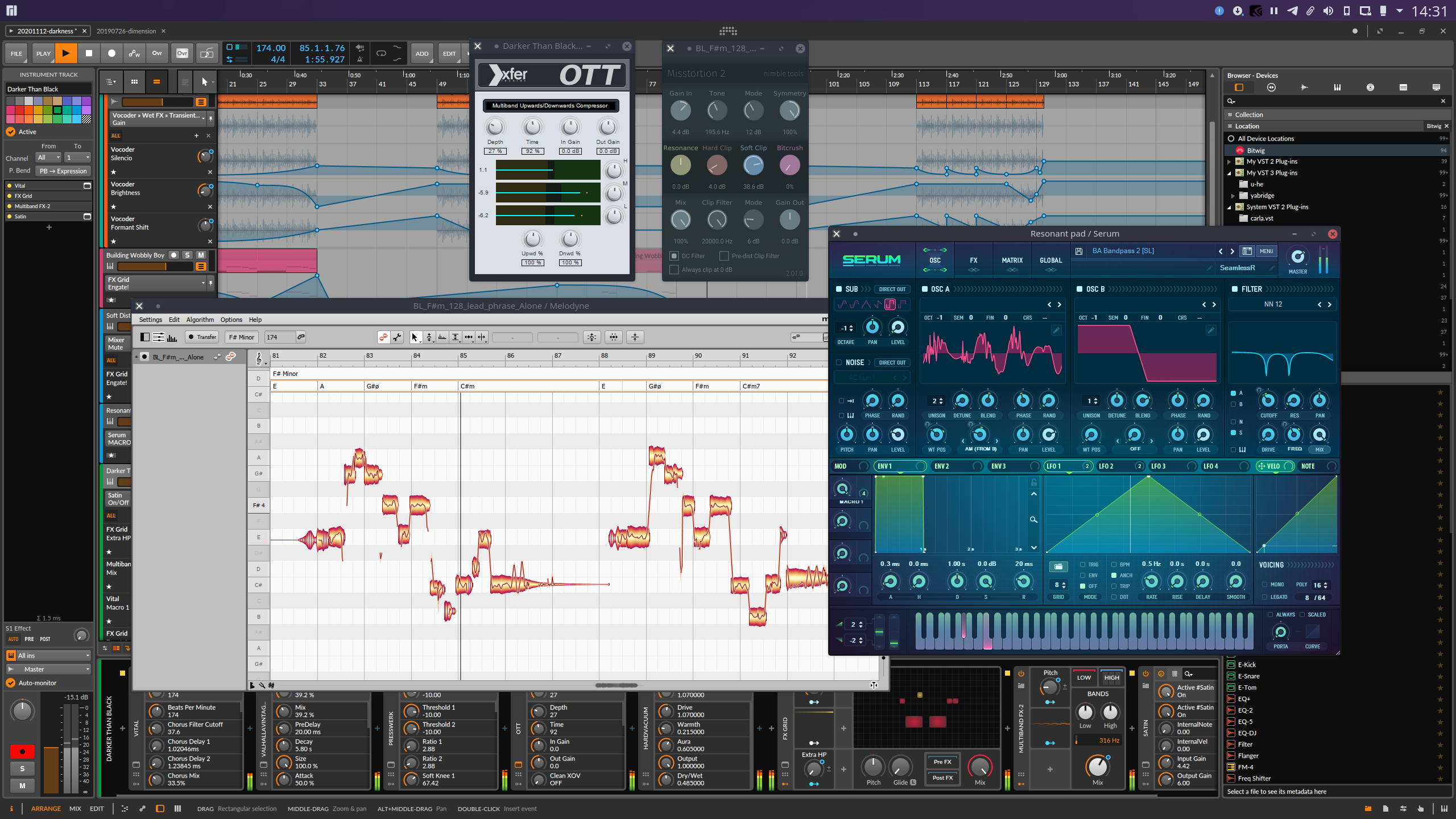
Yet Another way to use Windows VST plugins on Linux. Yabridge seamlessly
|
|
supports running both 64-bit Windows VST2 plugins as well as 32-bit Windows VST2
|
|
plugins in a 64-bit Linux VST host, with optional support for inter-plugin
|
|
communication through [plugin groups](#plugin-groups). This project aims to be
|
|
as transparent as possible in order to achieve the best possible plugin
|
|
compatibility while also staying easy to debug and maintain.
|
|
|
|
|
|
|
|
### Table of contents
|
|
|
|
- [Tested with](#tested-with)
|
|
- [Usage](#usage)
|
|
- [Automatic setup](#automatic-setup)
|
|
- [Manual setup](#manual-setup)
|
|
- [Search path setup](#search-path-setup)
|
|
- [DAW setup](#daw-setup)
|
|
- [Bitbridge](#bitbridge)
|
|
- [Wine prefixes](#wine-prefixes)
|
|
- [Configuration](#configuration)
|
|
- [Plugin groups](#plugin-groups)
|
|
- [Miscellaneous fixes and workarounds](#miscellaneous-fixes-and-workarounds)
|
|
- [Example](#example)
|
|
- [Troubleshooting common issues](#troubleshooting-common-issues)
|
|
- [Performance tuning](#performance-tuning)
|
|
- [Runtime dependencies and known issues](#runtime-dependencies-and-known-issues)
|
|
- [Building](#building)
|
|
- [32-bit bitbridge](#32-bit-bitbridge)
|
|
- [Debugging](#debugging)
|
|
- [Attaching a debugger](#attaching-a-debugger)
|
|
|
|
## Tested with
|
|
|
|
Yabridge has been tested under the following VST hosts using Wine Staging 5.9:
|
|
|
|
- Bitwig Studio 3.2
|
|
- Carla 2.1
|
|
- Ardour 6.2
|
|
- Mixbus 6.0.702
|
|
- REAPER 6.09[\*](#runtime-dependencies-and-known-issues)
|
|
- Renoise 3.2.1[\*](#runtime-dependencies-and-known-issues)
|
|
|
|
Please let me know if there are any issues with other VST hosts.
|
|
|
|
## Usage
|
|
|
|
You can either download a prebuilt version of yabridge through GitHub's
|
|
[releases](https://github.com/robbert-vdh/yabridge/releases) section, or you can
|
|
compile it from source using the instructions in the [build](#Building) section
|
|
below. Alternatively there are AUR packages available if you are running Arch or
|
|
Manjaro ([yabridge](https://aur.archlinux.org/packages/yabridge/),
|
|
[yabridge-bin](https://aur.archlinux.org/packages/yabridge-bin/),
|
|
[yabridge-git](https://aur.archlinux.org/packages/yabridge-git/)).
|
|
|
|
There are two ways to use yabridge, either by using copies or through symbolink
|
|
links. If your host supports plugin sanboxing, then using symlinks will be the
|
|
easier installation method. The main advantage here is that you will be able to
|
|
update yabridge for all of your plugins by just overwriting yabridge's files,
|
|
and it avoids having to either install yabridge outside of your home directory
|
|
or to modify environment variables to get yabridge to find the correct files.
|
|
Sadly, not all hosts support this behavior. The copy-based installation will
|
|
work for all hosts. If you decide to use the symlink-based installation method
|
|
with Bitwig Studio, then make sure the _Individually_ plugin hosting mode is
|
|
enabled.
|
|
|
|
### Automatic setup
|
|
|
|
The easiest way to get up and running is through
|
|
[yabridgectl](https://github.com/robbert-vdh/yabridge/tree/master/tools/yabridgectl).
|
|
You can download yabridgectl from GitHub's
|
|
[releases](https://github.com/robbert-vdh/yabridge/releases) section. There is
|
|
also an AUR package available if you are running Arch of Manjaro
|
|
([yabridgectl-git](https://aur.archlinux.org/packages/yabridgectl-git/), it's
|
|
also included in
|
|
[yabridge-bin](https://aur.archlinux.org/packages/yabridge-bin/)). More
|
|
comprehensive documentation can be found in yabridgectl's readme, or by running
|
|
`yabridgectl --help`.
|
|
|
|
First of all, yabridgectl needs to know where it can find yabridge's files. If
|
|
you have downloaded the prebuilt binaries, then you can simply extract the
|
|
archive to `~/.local/share` and yabridgectl will pick up the files in
|
|
`~/.local/share/yabridge` automatically. You also won't to do any additional
|
|
setup if you're using one of the AUR packages. If you have compiled yabridge
|
|
from source or if you installed the files to some other location, then you can
|
|
use `yabridgectl set --path=<path>` to tell yabridgectl where it can find the
|
|
files.
|
|
|
|
Secondly, yabridgectl will default to the copy-based installation method. If you
|
|
are using a VST host with individually sandboxed plugins such as Bitwig Studio
|
|
and you want to use the symlink-based installation method instead, then you can
|
|
enable that using `yabridgectl set --method=symlink`.
|
|
|
|
Next you'll want to tell yabridgectl where it can find your plugins. For this
|
|
you can use yabridgectl's `add`, `rm` and `list` commands. For instance, to add
|
|
the most common VST2 plugin directory, use `yabridgectl add "$HOME/.wine/drive_c/Program Files/Steinberg/VstPlugins"`. You can also use
|
|
`yabridgectl status` to get an overview of the current settings and the
|
|
installation status of all of your plugins.
|
|
|
|
Finally you can run `yabridgectl sync` to finish setting up yabridge. Simply
|
|
tell your VST host to search for plugins in the directories you just added and
|
|
you'll be good to go. Don't forget to rerun `yabridgectl sync` whenever you
|
|
update yabridge if you are using the copy-based installation method.
|
|
|
|
### Manual setup
|
|
|
|
To set up yabridge without using yabridgectl, first download and extract
|
|
yabridge's files like in the section above. The rest of this section assumes
|
|
that you have extracted the files to `~/.local/share` (such that
|
|
`~/.local/share/yabridge/libyabridge.so` exists), and that you want to set up
|
|
yabridge for the VST2 plugin called `~/.wine/drive_c/Program Files/Steinberg/VstPlugins/plugin.dll`.
|
|
|
|
Depending on whether you want to use copy or symlink-based installation method,
|
|
you can then set up yabridge for that plugin by creating a copy or symlink of
|
|
`libyabridge.so` next to `plugin.dll` called `plugin.so`. For the example,
|
|
you can use either:
|
|
|
|
```shell
|
|
# For the copy-based installation method
|
|
cp ~/.local/share/yabridge/libyabridge.so "$HOME/.wine/drive_c/Program Files/Steinberg/VstPlugins/plugin.so"
|
|
# For the symlink-based installation method
|
|
ln -sf ~/.local/share/yabridge/libyabridge.so "$HOME/.wine/drive_c/Program Files/Steinberg/VstPlugins/plugin.so"
|
|
```
|
|
|
|
If you are using the copy-based installation method, then don't forget to
|
|
overwrite all copies of `libyabridge.so` you created this way whenever you
|
|
update yabridge.
|
|
|
|
### Search path setup
|
|
|
|
If you are using the _copy-based_ installation method with the prebuilt binaries
|
|
from GitHub's releases section, then you'll have to modify your _login shell_'s
|
|
`PATH` environment variable so that yabridge is able to find `yabridge-host.exe`
|
|
and other related files. Yabridgectl will automatically check whether this is
|
|
set up correctly when you run `yabridgectl sync`, and it will show a warning if
|
|
it detects any issues.
|
|
|
|
To do this, you'll want to add yabridge's installation directory to your login
|
|
shell's `PATH` environment variable. If you're unsure what your login shell is,
|
|
then you can open a terminal and run `echo $SHELL` to find out. For the below
|
|
examples I'll assume you're using the default installation location at
|
|
`~/.local/share/yabridge`.
|
|
|
|
- If you are using the default **Bash** shell, then you will want to add the
|
|
following line to `~/.bash_profile` (or `~/.profile` if it does not exist):
|
|
|
|
```shell
|
|
export PATH="$HOME/.local/share/yabridge:$PATH"
|
|
```
|
|
|
|
- If you are using **Zsh**, then you can add the following line to `~/.zprofile`
|
|
(`~/.zshenv` should also work, but some distros such as Arch Linux overwrite
|
|
`PATH` after this file has been read):
|
|
|
|
```shell
|
|
export PATH="$HOME/.local/share/yabridge:$PATH"
|
|
```
|
|
|
|
- If you are using **fish**, then you can add the following line to either
|
|
`~/.config/fish/config.fish` or some file in `~/.config/fish/conf.d/`:
|
|
|
|
```shell
|
|
set -gp fish_user_paths ~/.local/share/yabridge
|
|
```
|
|
|
|
Rerun `yabridgectl sync` to make sure that the setup has been successful. If the
|
|
environment variable has been set up correctly, you should not be seeing any
|
|
warnings. Make sure to log out and log back in again to ensure that all
|
|
applications pick up the new changes.
|
|
|
|
### DAW setup
|
|
|
|
Finally, open your DAW's VST location configuration and tell it to look for
|
|
plugins under `~/.wine/drive_c/Program Files/Steinberg/VstPlugins`. That way it
|
|
will automatically pick up any of your Windows VST2 plugins.
|
|
|
|
### Bitbridge
|
|
|
|
If you have downloaded the prebuilt version of yabridge or if have followed the
|
|
instructions from the [bitbridge](#32-bit-bitbridge) section below, then
|
|
yabridge is also able to load 32-bit VST plugins. The installation procedure for
|
|
32-bit plugins is exactly the same as for 64-bit plugins. Yabridge will
|
|
automatically detect whether a plugin is 32-bit or 64-bit on startup and it will
|
|
handle it accordingly.
|
|
|
|
### Wine prefixes
|
|
|
|
It is also possible to use yabridge with multiple Wine prefixes. Yabridge will
|
|
automatically detect and use the Wine prefix the plugin's `.dll` file is located
|
|
in. Alternatively you could set the `WINEPREFIX` environment variable to
|
|
override the Wine prefix for all instances of yabridge.
|
|
|
|
### Configuration
|
|
|
|
Configuring yabridge for specific plugins is done through a `yabridge.toml` file
|
|
located in either the same directory as the symlink to or copy of
|
|
`libyabridge.so` you're trying to configure or in any of its parent directories.
|
|
This file contains case sensitive
|
|
[glob](https://www.man7.org/linux/man-pages/man7/glob.7.html) patterns that
|
|
paths of yabridge `.so` files relative to that `yabridge.toml` file. These
|
|
patterns can also match an entire directory to apply settings to all plugins
|
|
within that directory. For simplicity's sake, only the first `yabridge.toml`
|
|
file found and only the first matching glob pattern within that file will be
|
|
considered. See below for an [example](#example) of a `yabridge.toml` file.
|
|
|
|
#### Plugin groups
|
|
|
|
Some plugins have the ability to communicate with other instances of that same
|
|
plugin or even with other plugins made by the same manufacturer. This is often
|
|
used in mixing plugins to allow different tracks to reference each other without
|
|
having to route audio between them. Examples of plugins that do this are
|
|
FabFilter Pro-Q 3, MMultiAnalyzer and the iZotope mixing plugins. In order for
|
|
this to work, all instances of a particular plugin will have to be hosted in the
|
|
same process.
|
|
|
|
Yabridge has the concept of _plugin groups_, which are user defined groups of
|
|
plugins that will all be hosted inside of a single process. Plugins groups can
|
|
be configured for a plugin by setting the `group` option of that plugin to some
|
|
name. All plugins with the same group name will be hosted within a single
|
|
process. Of course, plugin groups with the same name but in different Wine
|
|
prefixes and with different architectures will be run independently of each
|
|
other. See below for an [example](#example) of how these groups can be set up.
|
|
|
|
#### Miscellaneous fixes and workarounds
|
|
|
|
Because Linux VST hosts are typically not tested using Windows VST plugins and
|
|
because some Windows VST plugins make incorrect assumptions about the host or
|
|
the environment, you may run into implementation issues when combining certain
|
|
hosts and VST plugins. This section contains a few options you can use to work
|
|
around these issues. The [known issues](#runtime-dependencies-and-known-issues)
|
|
section contains more information on when these options might be necessary.
|
|
Yabridge will show which of these options are active on startup as part of the
|
|
initialization message.
|
|
|
|
- Both _REAPER_ and _Renoise_ can freeze when the plugin uses the
|
|
`audioMasterUpdateDisplay()` function while the host is updating the editor
|
|
window. As a temporary workaround until this is fixed you can set the
|
|
`hack_reaper_update_display` option to `true`. If you set this option for the
|
|
`["*"]` pattern like in the example below, then this will be applied to all
|
|
yabridge `.so` files in the directory of the `yabridge.toml` files and all
|
|
directories below it. If you have added any other patterns to the
|
|
`yabridge.toml` file you'll also have to add the setting there since yabridge
|
|
will only read settings from the first matching pattern. See the example below
|
|
for more clarification.
|
|
- The way yabridge embeds editor windows will work for most plugins. There is a
|
|
second embedding mode available that adds yet another layer of embedding. This
|
|
can be enabled by setting the `editor_double_embed` option to `true`. At the
|
|
moment the only known plugins that need this are _PSPaudioware_ plugins with
|
|
expandable GUIs such as E27 as those plugins will otherwise draw in the wrong
|
|
location after the GUI has been expanded. This setting may be replaced in the
|
|
future if we can come up with a better solution.
|
|
|
|
#### Example
|
|
|
|
All of the paths used here are relative to the `yabridge.toml` file.
|
|
|
|
```toml
|
|
# ~/.wine/drive_c/Program Files/Steinberg/VstPlugins/yabridge.toml
|
|
|
|
["FabFilter Pro-Q 3.so"]
|
|
group = "fabfilter"
|
|
|
|
["MeldaProduction/Tools/MMultiAnalyzer.so"]
|
|
group = "melda"
|
|
|
|
["PSPaudioware"]
|
|
editor_double_embed = true
|
|
|
|
# Matches an entire directory and all files inside it, make sure to not include
|
|
# a trailing slash
|
|
["ToneBoosters"]
|
|
hack_reaper_update_display = true
|
|
group = "toneboosters"
|
|
|
|
# Simple glob patterns can be used to avoid a unneeded repitition
|
|
["iZotope*/Neutron *"]
|
|
group = "izotope"
|
|
|
|
# Of course, you can also add multiple plugins to the same group by hand
|
|
["iZotope7/Insight 2.so"]
|
|
group = "izotope"
|
|
|
|
# This won't do anything as this file has already been matched by the pattern
|
|
# above
|
|
["iZotope7/Neutron 2 Mix Tap.so"]
|
|
group = "This will be ignored!"
|
|
|
|
# Don't do this unless you know what you're doing! This matches all plugins in
|
|
# this directory and all of its subdirectories, which will cause all of them to
|
|
# be hosted in a single process. While this would increase startup and plugin
|
|
# scanning performance considerably, it will also break any form of individual
|
|
# plugin sandboxing provided by the host and could potentially introduce all
|
|
# kinds of weird issues.
|
|
# ["*"]
|
|
# group = "all"
|
|
|
|
# This will apply a workaround for an implementation issue in REAPER and Renoise
|
|
# to all plugins in the current directory _that are not already matched by one
|
|
# of the above patterns_. You will have to add this option to any other entries
|
|
# if you are for instance using plugin groups. See the ToneBoosters entry above
|
|
# for an example.
|
|
["*"]
|
|
hack_reaper_update_display = true
|
|
```
|
|
|
|
## Troubleshooting common issues
|
|
|
|
- If you're using the copy-based installation method and plugins are getting
|
|
skipped or blacklisted immediately when your VST host is scanning them, then
|
|
this is likely caused by `yabridge-host.exe` not being found in your search
|
|
path. See the [search path setup](#search-path-setup) section for instructions
|
|
on how to fix this.
|
|
|
|
- If you're using the symlink installation method and you're seeing multiple
|
|
duplicate instances of the same plugin, or after opening a single plugin every
|
|
subsequent plugin opens as another instance of that first plugin, then your
|
|
VST host is not sandboxing individual plugins. If you're using Bitwig Studio,
|
|
the make sure the '_Individual_' plugin hosting mode is enabled and all of the
|
|
checkboxes in the list of sandboxing exceptions are left unchecked.
|
|
|
|
- If you're using a symlink and the plugin is not getting picked up at all, then
|
|
you can verify that the symlink is correct by running:
|
|
|
|
```shell
|
|
readelf -s ~/.wine/drive_c/path/to/plugin.so | grep yabridge
|
|
```
|
|
|
|
The output should contain several lines related to yabridge.
|
|
|
|
- If you're seeing errors related to Wine, then it can be that your installed
|
|
version of Wine is much older than the version that yabridge has been compiled
|
|
for. Yabridgectl will automatically check for this when you run `yabridgectl sync`
|
|
after updating Wine or yabridge. You can also manually verify that Wine is working
|
|
correctly by running one of the VST host applications. Assuming that yabridge
|
|
is installed under `~/.local/share/yabridge`, then running
|
|
`~/.local/share/yabridge/yabridge-host.exe` directly (so _not_
|
|
`wine ~/.local/share/yabridge/yabridge-host.exe`, that won't work) in a
|
|
terminal should print a few messages related to Wine's startup process
|
|
followed by the following line:
|
|
|
|
```
|
|
Usage: yabridge-host.exe <vst_plugin_dll> <unix_domain_socket>
|
|
```
|
|
|
|
If you're seeing a `002b:err:module:__wine_process_init` error instead, then
|
|
your version of Wine is too old for this version of yabridge and you'll have
|
|
to upgrade your Wine version. Instructions for how to do this on Ubuntu can be
|
|
found on the [WineHQ website](https://wiki.winehq.org/Ubuntu).
|
|
|
|
- Sometimes left over Wine processes can cause problems. Run `wineserver -k` to
|
|
terminate Wine related in the current or default Wine prefix.
|
|
|
|
- Time out errors during plugin scanning are caused by the Wine process not
|
|
being able to start. There should be plugin output messages in your DAW or
|
|
terminal that with more information on what went wrong.
|
|
|
|
## Performance tuning
|
|
|
|
Running Windows VST plugins under Wine should have minimal performance impact,
|
|
but you may still notice an increase in audio spikes and overall processing
|
|
latency. Luckily there are a few things you can do to get rid of most or all of
|
|
these negative side effects:
|
|
|
|
- First of all, you'll want to make sure that you can run programs with realtime
|
|
priorities. Note that on Arch and Manjaro this does not necessarily require a
|
|
realtime kernel as they include the `PREMPT` patch set in their regular
|
|
kernels. You can verify that this is workign correctly by running
|
|
`chrt -f 10 whoami`, which should print your username.
|
|
|
|
- The other even more important thing you can do is to use a build of Wine with
|
|
Proton's fsync patches. This can improve performance significantly, especially
|
|
when using a lot of plugins at the same time. If you're running Arch or
|
|
Manjaro, then you can use
|
|
[this](https://github.com/nine7nine/pkgbuilds_nspa/tree/master/wine-nspa)
|
|
PKGBUILD to build an audio production optimized version of Wine. Aside from a
|
|
patched copy of Wine you'll also need a supported kernel for this to work.
|
|
Manjaro's kernel supports fsync out of the box, and on Arch you can use the
|
|
`linux-zen` kernel. Finally you'll have to set the `WINEFSYNC` environment
|
|
variable to `1` to enable fsync. See the [search path
|
|
setup](#search-path-setup) section for more information on where to do this.
|
|
You can use the following command to check if this is set correctly:
|
|
|
|
```shell
|
|
env -i HOME="$HOME" $SHELL -l -c 'echo $WINEFSYNC'
|
|
```
|
|
|
|
If this prints `1` then everything is set up correctly. Running `wineboot`
|
|
from a terminal should now also print `fsync: up and running.`. You'll have to
|
|
log out and back in again for this to take effect on applications launched
|
|
from the GUI.
|
|
|
|
If anyone knows a good way to install an fsync patched version of Wine on
|
|
other distros, then please let me know!
|
|
|
|
## Runtime dependencies and known issues
|
|
|
|
Any VST2 plugin should function out of the box, although some plugins will need
|
|
some additional dependencies for their GUIs to work correctly. Notable examples
|
|
include:
|
|
|
|
- **REAPER** and **Renoise** can both freeze when using plugins that call the
|
|
`audioMasterUpdateDisplay()` function because of mutual recursion limitations.
|
|
Until this is fixed you can set an
|
|
[option](#miscellaneous-fixes-and-workarounds) through `yabridge.toml` to work
|
|
around this.
|
|
- **Native Instruments** plugins work, but Native Access is unable to finish
|
|
installing the plugins. To work around this you can open the .iso file
|
|
downloaded to your downloads directory and run the installer directly. When
|
|
activating the plugins you may have to cancel the self-updating in NI Service
|
|
Center.
|
|
- **Serum** requires you to disable `d2d1.dll` in `winecfg` and to install
|
|
`gdiplus` through `winetricks`.
|
|
- **MeldaProduction** plugins have minor rendering issues when GPU acceleration
|
|
is enabled. This can be fixed by disabling GPU acceleration in the plugin
|
|
settings. I'm not sure whether this is an issue with Wine or the plugins
|
|
themselves. Notable issues here are missing redraws and incorrect positioning
|
|
when the window gets dragged offscreen on the top and left dies of the screen.
|
|
- **PSPaudioware** plugins with expandable GUIs, such as E27, may have their GUI
|
|
appear in the wrong location after the GUI has been expanded. You can enable
|
|
an alternative [editor hosting mode](#miscellaneous-fixes-and-workarounds) to
|
|
fix this.
|
|
- Plugins like **FabFilter Pro-Q 3** that can share data between different
|
|
instances of the same plugin plugins have to be hosted within a single process
|
|
for that functionality to work. See the [plugin groups](#plugin-groups)
|
|
section for instructions on how to set this up.
|
|
|
|
Aside from that, these are some known caveats:
|
|
|
|
- Plugins by **KiloHearts** have file descriptor leaks when esync is enabled,
|
|
causing Wine and yabridge to eventually stop working after the system hits the
|
|
open file limit. This sadly cannot be fixed in yabridge. Simply unset
|
|
`WINEESYNC` while using yabridge or switch to using fsync if this is an issue.
|
|
- Most recent **iZotope** plugins don't have a functional GUI in a typical out
|
|
of the box Wine setup because of missing dependencies. Please let me know if
|
|
you know which dependencies are needed for these plugins to render correctly.
|
|
- MIDI key labels (for use with drum machines and multisamplers) will not be
|
|
updated once the plugin has finished loading since there's no way to tell that
|
|
they have been updated by the plugin. Right now simply deactivating and
|
|
reactivating the plugin will cause these labels to be updated.
|
|
- Under Bitwig Studio, opening the editor for a plugin that perform IO while
|
|
loading its editor may cause playback to pause briefly during that time.
|
|
Examples of plugins that do this include recent versions of Kontakt and the
|
|
Spitfire plugins. This happens because Bitwig expects the plugins to be able
|
|
to instantly report their editor size before actually opening the editor, but
|
|
instead of doing so these plugins will instead perform a bunch of IO first and
|
|
Bitwig will wait patiently for them to finish. It would be possible to modify
|
|
yabridge to work around this limitation of Bitwig, but I'm very hesitant to
|
|
add hacks to yabridge unless absolutely necessary.
|
|
- Drag-and-drop from plugins to the host does not work. This is sadly not yet
|
|
implemented in Wine, although in theory it would be possible to create a small
|
|
utility that supports both Wine <-> Wine and X11 <-> X11 drag-and-drop to act
|
|
as a bridge.
|
|
|
|
There are also some VST2.X extension features that have not been implemented yet
|
|
because I haven't needed them myself. Let me know if you need any of these
|
|
features for a certain plugin or VST host:
|
|
|
|
- Double precision audio (`processDoubleReplacing`).
|
|
- SysEx messages. In addition to MIDI, VST 2.4 also supports SysEx. I don't know
|
|
of any hosts or plugins that use this, but please let me know if this is
|
|
needed for something.
|
|
- Vendor specific extension (for instance, for
|
|
[REAPER](https://www.reaper.fm/sdk/vst/vst_ext.php), though most of these
|
|
extension functions will work out of the box without any modifications).
|
|
|
|
## Building
|
|
|
|
To compile yabridge, you'll need [Meson](https://mesonbuild.com/index.html) and
|
|
the following dependencies:
|
|
|
|
- GCC 10+\*
|
|
- A Wine installation with `winegcc` and the development headers. The latest
|
|
commits contain a workaround for a winelib [compilation
|
|
issue](https://bugs.winehq.org/show_bug.cgi?id=49138) with Wine 5.7+.
|
|
- Boost version 1.66 or higher\*
|
|
- libxcb
|
|
|
|
The following dependencies are included in the repository as a Meson wrap:
|
|
|
|
- bitsery
|
|
- tomlplusplus
|
|
|
|
The project can then be compiled as follows:
|
|
|
|
```shell
|
|
meson setup --buildtype=release --cross-file cross-wine.conf build
|
|
ninja -C build
|
|
```
|
|
|
|
After you've finished building you can follow the instructions under the
|
|
[usage](#usage) section on how to set up yabridge.
|
|
|
|
<sup>
|
|
*The versions of GCC and Boost that ship with Ubuntu 18.04 by default are too
|
|
old to compile yabridge. If you do wish to build yabridge from scratch rather
|
|
than using the <a
|
|
href="https://github.com/robbert-vdh/yabridge/actions?query=workflow%3A%22Automated+builds%22+branch%3Amaster">prebuilt
|
|
binaries</a>, then you should take a look at the <a
|
|
href="https://github.com/robbert-vdh/docker-yabridge/blob/master/bionic/Dockerfile">docker
|
|
image</a> used when building yabridge on Ubuntu 18.04 for on overview of what
|
|
would need to be installed to compile on Ubuntu 18.04.
|
|
</sup>
|
|
|
|
### 32-bit bitbridge
|
|
|
|
It is also possible to compile a host application for yabridge that's compatible
|
|
with 32-bit plugins such as old SynthEdit plugins. This will allow yabridge to
|
|
act as a bitbirdge, allowing you to run old 32-bit only Windows VST2 plugins in
|
|
a modern 64-bit Linux VST host. For this you'll need to have installed the 32
|
|
bit versions of the Boost and XCB libraries. This can then be set up as follows:
|
|
|
|
```shell
|
|
# Enable the bitbridge on an existing build
|
|
meson configure build -Dwith-bitbridge=true
|
|
# Or configure a new build from scratch
|
|
meson setup --buildtype=release --cross-file cross-wine.conf -Dwith-bitbridge=true build
|
|
|
|
ninja -C build
|
|
```
|
|
|
|
This will produce four files called `yabridge-host-32.exe`,
|
|
`yabridge-host-32.exe.so`, `yabridge-group-32.exe` and
|
|
`yabridge-group-32.exe.so`. Yabridge will detect whether the plugin you're
|
|
trying to load is 32-bit or 64-bit, and will run either the regular version or
|
|
the `*-32.exe` variant accordingly.
|
|
|
|
## Debugging
|
|
|
|
Wine's error messages and warning are usually very helpful whenever a plugin
|
|
doesn't work right away. However, with some VST hosts there is no way to inspect
|
|
a plugin's output. Bitwig, for instance, hides a plugin's STDOUT and STDERR
|
|
streams after the plugin scanning process. To make it easier to debug
|
|
malfunctioning plugins, yabridge offers these two environment variables to
|
|
control yabridge's logging facilities:
|
|
|
|
- `YABRIDGE_DEBUG_FILE=<path>` allows you to write yabridge's debug messages as
|
|
well as all output produced by the plugin and by Wine itself to a file. For
|
|
instance, you could launch your DAW with
|
|
`env YABRIDGE_DEBUG_FILE=/tmp/yabridge.log <daw>`, and then use
|
|
`tail -F /tmp/yabridge.log` to keep track of the output. If this option is not
|
|
present then yabridge will write all of its debug output to STDERR instead.
|
|
- `YABRIDGE_DEBUG_LEVEL={0,1,2}` allows you to set the verbosity of the debug
|
|
information. Each level increases the amount of debug information printed:
|
|
|
|
- A value of `0` (the default) means that yabridge will only log the output
|
|
from the Wine process the Wine process and some basic information about the
|
|
environment, the configuration and the plugin being loaded.
|
|
- A value of `1` will log detailed information about most events and function
|
|
calls sent between the VST host and the plugin. This filters out some noisy
|
|
events such as `effEditIdle()` and `audioMasterGetTime()` since those are
|
|
sent multiple times per second by for every plugin.
|
|
- A value of `2` will cause all of the events to be logged without any
|
|
filtering. This is very verbose but it can be crucial for debugging
|
|
plugin-specific problems.
|
|
|
|
More detailed information about these debug levels can be found in
|
|
`src/common/logging.h`.
|
|
|
|
Wine's own [logging facilities](https://wiki.winehq.org/Debug_Channels) can also
|
|
be very helpful when diagnosing problems. In particular the `+message` and
|
|
`+relay` channels are very useful to trace the execution path within loaded VST
|
|
plugin itself.
|
|
|
|
### Attaching a debugger
|
|
|
|
When needed, I found the easiest way to debug the plugin to be to load it in an
|
|
instance of Carla with gdb attached:
|
|
|
|
```shell
|
|
env YABRIDGE_DEBUG_FILE=/tmp/yabridge.log YABRIDGE_DEBUG_LEVEL=2 carla --gdb
|
|
```
|
|
|
|
Doing the same thing for the Wine VST host can be a bit tricky. You'll need to
|
|
launch winedbg in a seperate detached terminal emulator so it doesn't terminate
|
|
together with the plugin, and winedbg can be a bit picky about the arguments it
|
|
accepts. I've already set this up behind a feature flag for use in KDE Plasma.
|
|
Other desktop environments and window managers will require some slight
|
|
modifications in `src/plugin/plugin-bridge.cpp`. To enable this, simply run:
|
|
|
|
```shell
|
|
meson configure build --buildtype=debug -Dwith-winedbg=true
|
|
```
|