mirror of
https://github.com/robbert-vdh/yabridge.git
synced 2026-05-06 19:40:10 +02:00
 Robbert van der Helm
936 lines
53 KiB
Markdown
936 lines
53 KiB
Markdown
# yabridge
|
|
|
|
[](https://github.com/robbert-vdh/yabridge/actions?query=workflow%3A%22Automated+builds%22+branch%3Amaster)
|
|
[](https://discord.gg/pyNeweqadf)
|
|
|
|
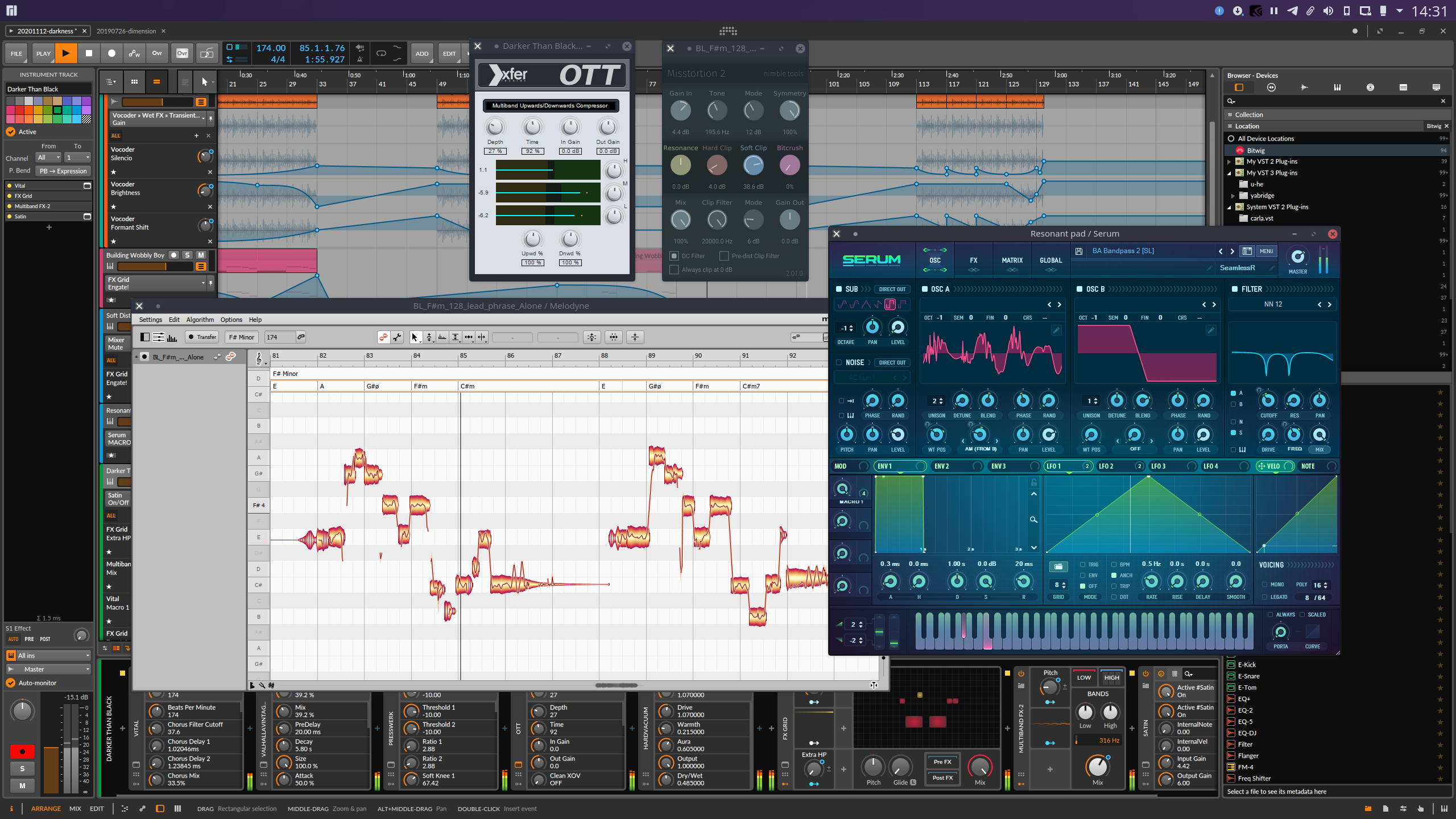
Yet Another way to use Windows audio plugins on Linux. Yabridge seamlessly
|
|
supports using both 32-bit and 64-bit Windows VST2, VST3, and CLAP plugins in
|
|
64-bit Linux plugin hosts as if they were native plugins, with optional support
|
|
for [plugin groups](#plugin-groups) to enable inter-plugin communication for
|
|
VST2 plugins and quick startup times. Its modern concurrent architecture and
|
|
focus on transparency allows yabridge to be both fast and highly compatible,
|
|
while also staying easy to debug and maintain.
|
|
|
|
|
|
|
|
### Table of contents
|
|
|
|
- [Tested with](#tested-with)
|
|
- [**Usage**](#usage)
|
|
- [Bitbridge](#bitbridge)
|
|
- [Wine prefixes](#wine-prefixes)
|
|
- [Drag-and-drop](#drag-and-drop)
|
|
- [Input focus grabbing](#input-focus-grabbing)
|
|
- [Downgrading Wine](#downgrading-wine)
|
|
- [Installing a development build](#installing-a-development-build)
|
|
- [Configuration](#configuration)
|
|
- [Plugin groups](#plugin-groups)
|
|
- [Compatibility options](#compatibility-options)
|
|
- [Example](#example)
|
|
- [**Known issues and fixes**](#known-issues-and-fixes)
|
|
- [**Troubleshooting common issues**](#troubleshooting-common-issues)
|
|
- [**Performance tuning**](#performance-tuning)
|
|
- [Environment configuration](#environment-configuration)
|
|
- [Building](#building)
|
|
- [32-bit bitbridge](#32-bit-bitbridge)
|
|
- [32-bit libraries](#32-bit-libraries)
|
|
- [Debugging](#debugging)
|
|
- [Attaching a debugger](#attaching-a-debugger)
|
|
|
|
## Tested with
|
|
|
|
Yabridge has been tested under the following hosts using Wine Staging 8.0.
|
|
|
|
| Host | VST2 | VST3 | CLAP |
|
|
| --------------------- | ------------------ | -------------------------------------------------------------------- | ---------------------------------------------------- |
|
|
| Bitwig Studio 4.4.6\* | :heavy_check_mark: | :heavy_check_mark: | :heavy_check_mark: |
|
|
| REAPER 6.71 | :heavy_check_mark: | :heavy_check_mark: | :heavy_check_mark: |
|
|
| Carla 2.5.0 | :heavy_check_mark: | :heavy_check_mark: | Does not support CLAP |
|
|
| Qtractor 0.9.29 | :heavy_check_mark: | :warning: VST3 editor windows may not have the correct size | :warning: Qtractor may not support every CLAP plugin |
|
|
| Renoise 3.4.2 | :heavy_check_mark: | :warning: Renoise doesn't handle VST3 editor window sizing correctly | Does not support CLAP |
|
|
| Waveform 12.1.3 | :heavy_check_mark: | :heavy_check_mark: | Does not support CLAP |
|
|
| Ardour 7.0 | :heavy_check_mark: | :heavy_check_mark: | Does not support CLAP |
|
|
| Mixbus 7.0.140 | :heavy_check_mark: | :heavy_check_mark: | Does not support CLAP |
|
|
|
|
Please let me know if there are any issues with other hosts.
|
|
|
|
<sup>
|
|
*Bitwig Studio's Flatpak version will not work with yabridge. You'll need to use the .deb found on the release notes page instead.
|
|
</sup>
|
|
|
|
## Usage
|
|
|
|
0. First of all, yabridge requires a recent-ish version of Wine (Staging). Users
|
|
of Debian, Ubuntu, Linux Mint and Pop!\_OS should install Wine Staging from
|
|
the [WineHQ repositories](https://wiki.winehq.org/Download) as the Wine
|
|
versions provided by those distro's repositories may be too old to be used
|
|
with yabridge. On other distros you should be able to just install
|
|
`wine-staging` using your distro's package manager.
|
|
|
|
For a general overview on how to use Wine to install Windows applications,
|
|
check out Wine's [user
|
|
guide](https://wiki.winehq.org/Wine_User%27s_Guide#Using_Wine).
|
|
|
|
1. Depending on your distro you can install yabridge and its yabridgectl
|
|
companion utility through your distro's package manager or by using
|
|
a binary archive from the GitHub releases page. Keep in mind that the distro
|
|
packages mentioned below may not always be up to date, and some may also not
|
|
be compiled with support for 32-bit plugins.
|
|
|
|
<a href="https://repology.org/project/yabridge/versions" target="_blank" rel="noopener" title="Packaging status"><img align="right" src="https://repology.org/badge/vertical-allrepos/yabridge.svg"></a>
|
|
|
|
- On **Arch** and **Manjaro**, yabridge and yabridgectl can be installed from
|
|
the official repositories using the
|
|
[`yabridge`](https://archlinux.org/packages/multilib/x86_64/yabridge/) and
|
|
[`yabridgectl`](https://archlinux.org/packages/multilib/x86_64/yabridgectl/)
|
|
packages.
|
|
- On **Fedora**, you can install yabridge and yabridgectl from a
|
|
[COPR](https://copr.fedorainfracloud.org/coprs/patrickl/yabridge-stable/).
|
|
- On the **OpenSUSE** distros, yabridge and yabridgectl are packaged by
|
|
[GeekosDAW](https://geekosdaw.tuxfamily.org/en/).
|
|
- On **NixOS**, yabridge and yabridgectl are in the repositories.
|
|
|
|
- On **Ubuntu**, **Debian**, **Linux Mint**, **Pop!\_OS**, and any other
|
|
distro, you can simply download and install a prebuilt version of yabridge:
|
|
|
|
1. First download the latest version of yabridge from the [releases
|
|
page](https://github.com/robbert-vdh/yabridge/releases). If you're using
|
|
a distro that's older than Ubuntu 20.04 such as Ubuntu 18.04, Debian 10,
|
|
Linux Mint 19, or AV Linux MXE 2021, then you should download the
|
|
version that ends with `-ubuntu-18.04.tar.gz`.
|
|
2. Extract the contents of the downloaded archive to `~/.local/share`, such
|
|
that the file `~/.local/share/yabridge/yabridgectl` exists after
|
|
extracting. You can extract an archive here from the command line with
|
|
`tar -C ~/.local/share -xavf yabridge-x.y.z.tar.gz`. If you're
|
|
extracting the archive using a GUI file manager or archive tool, then
|
|
make sure that hidden files and directories are visible by pressing
|
|
<kbd>Ctrl+H</kbd>. You should also double check that your archive
|
|
extraction tool didn't create an additional subdirectory in
|
|
`~/.local/share`. Dragging and dropping the `yabridge` directory from
|
|
the archive directly to `~/.local/share` is the best way to make sure
|
|
this doesn't happen.
|
|
3. **Whenever any step after this mentions running `yabridgectl <something>`,
|
|
then you should run `~/.local/share/yabridge/yabridgectl <something>`
|
|
instead.**
|
|
|
|
Alternatively, you can also add that directory to your shell's search
|
|
path. That way you can run `yabridgectl` directly. If you don't know
|
|
what that means, then add `export PATH="$PATH:$HOME/.local/share/yabridge"`
|
|
to the end of `~/.bashrc` and reopen your terminal.
|
|
|
|
2. Setting up and updating yabridge for your plugins is done though the
|
|
`yabridgectl` command line utility. The basic idea is that you first install
|
|
your Windows plugins to their default locations within a Wine prefix just
|
|
like you would on regular Windows. and yabridgectl then manages those plugin
|
|
directories for you. You then tell yabridgectl where it can find those
|
|
plugins so it can manage them for you. That way you only ever need to run a
|
|
single command whenever you install or remove a plugin. Both yabridge and
|
|
yabridgectl will automatically detect your yabridge installation if you used
|
|
one of the installation methods from step 1.
|
|
|
|
To tell yabridgectl where it can find your Windows VST2, VST3, and CLAP
|
|
plugins, you can use yabridgectl's `add`, `rm` and `list` commands to add,
|
|
remove, and list the plugin directories yabridgectl is managing for you. You
|
|
can also use `yabridgectl status` to get an overview of the current settings
|
|
and the installation status for all of your plugins.
|
|
|
|
1. To add the most common VST2 plugin directory in the default Wine prefix, use
|
|
`yabridgectl add "$HOME/.wine/drive_c/Program Files/Steinberg/VstPlugins"`.
|
|
This directory may be capitalized as `VSTPlugins` on your system, and some
|
|
plugins may also install themselves to a similar directory directly inside
|
|
of Program Files.
|
|
2. VST3 plugins under Windows are always installed to
|
|
`C:\Program Files\Common Files\VST3`, and you can use
|
|
`yabridgectl add "$HOME/.wine/drive_c/Program Files/Common Files/VST3"` to
|
|
add that directory to yabridge.
|
|
3. CLAP plugins under Windows are always installed to
|
|
`C:\Program Files\Common Files\CLAP`, and you can use
|
|
`yabridgectl add "$HOME/.wine/drive_c/Program Files/Common Files/CLAP"` to
|
|
add that directory to yabridge.
|
|
|
|
3. Finally, you'll need to run `yabridgectl sync` to finish setting up yabridge
|
|
for all of your plugins. After doing so, your VST2, VST3, and CLAP plugins
|
|
will be set up in `~/.vst/yabridge`, `~/.vst3/yabridge`, and
|
|
`~/.clap/yabridge` respectively. Make sure your DAW searches `~/.vst`,
|
|
`~/.vst3`, and `~/.clap` for VST2, VST3, and CLAP plugins and you will be
|
|
good to go.
|
|
|
|
### Bitbridge
|
|
|
|
Yabridge can also load 32-bit Windows plugins so you can use them in your 64-bit
|
|
Linux DAW. Yabridge will automatically detect whether a plugin is 32-bit or
|
|
64-bit on startup and it will handle it accordingly. If you've installed
|
|
yabridge through a distro package, then it may be possible that your distro has
|
|
disabled this feature.
|
|
|
|
### Wine prefixes
|
|
|
|
It is also possible to use yabridge with multiple Wine prefixes at the same
|
|
time. Yabridge will automatically detect and use the Wine prefix the Windows
|
|
plugin's `.dll`, `.vst3`, or `.clap` file is located in. Alternatively, you can
|
|
set the `WINEPREFIX` environment variable to override the Wine prefix for _all
|
|
yabridge plugins_.
|
|
|
|
### Drag-and-drop
|
|
|
|
Yabridge supports drag-and-drop both from a native (X11) Linux application to
|
|
plugins running under yabridge, as well as from yabridge plugins to native X11
|
|
applications like your DAW or your file browser. When dragging things from a
|
|
plugin to your DAW, then depending on which DAW you're using it may look like
|
|
the drop is going to fail while you're still holding down the left mouse button.
|
|
That's expected, since yabridge's and Wine's own drag-and-drop systems are
|
|
active at the same time. If you're using yabridge in _REAPER_ or _Carla_, then
|
|
you may need to enable a [compatibility option](#compatibility-options) to
|
|
prevent those hosts from stealing the drop.
|
|
|
|
### Input focus grabbing
|
|
|
|
Yabridge tries to be clever about the way grabbing and releasing input focus for
|
|
a plugin works. One important detail here is that when grabbing input focus,
|
|
yabridge will always focus the _parent window_ passed by the host for the plugin
|
|
to embed itself into. This means that hosts like Bitwig Studio can still process
|
|
common key bindings like <kbd>Space</kbd> for play/pause even while you are
|
|
interacting with a plugin's GUI. The downside of this approach is that this also
|
|
means that in those hosts you simply cannot type a space character, as the key
|
|
will always go to the host.
|
|
|
|
For the very specific situations where you may want to focus the plugin's editor
|
|
directly so that all keyboard input goes to Wine, you can hold down the
|
|
<kbd>Shift</kbd> key while entering the plugin's GUI with your mouse. This will
|
|
let you type spaces in text fields in **Bitwig Studio**, type text into the
|
|
settings and license dialogs in **Voxengo** plugins, and it will also allow you
|
|
to navigate dropdowns with the keyboard.
|
|
|
|
### Downgrading Wine
|
|
|
|
If you run into software or a plugin that does not work correctly with the
|
|
current version of Wine Staging, then you may want to try downgrading to an
|
|
earlier version of Wine. This can be done as follows:
|
|
|
|
- On Debian, Ubuntu, Linux Mint and other apt-based distros, you can use the
|
|
command below to install Wine Staging 7.20 after you add the WineHQ
|
|
repositories linked above. This command is a bit cryptic because on these
|
|
distros the Wine package is split up into multiple smaller packages, and the
|
|
package versions include the distros codename (e.g. `focal`, or `buster`) as
|
|
well as some numeric suffix. Change the version to whatever version of Wine
|
|
you want to install, and then run these commands under Bash:
|
|
|
|
```shell
|
|
version=7.20
|
|
variant=staging
|
|
codename=$(shopt -s nullglob; awk '/^deb https:\/\/dl\.winehq\.org/ { print $3; exit 0 } END { exit 1 }' /etc/apt/sources.list /etc/apt/sources.list.d/*.list || awk '/^Suites:/ { print $2; exit }' /etc/apt/sources.list /etc/apt/sources.list.d/wine*.sources)
|
|
suffix=$(dpkg --compare-versions "$version" ge 6.1 && ((dpkg --compare-versions "$version" eq 6.17 && echo "-2") || echo "-1"))
|
|
sudo apt install --install-recommends {"winehq-$variant","wine-$variant","wine-$variant-amd64","wine-$variant-i386"}="$version~$codename$suffix"
|
|
```
|
|
|
|
If you want to prevent these packages from being updated automatically, then
|
|
you can do so with:
|
|
|
|
```shell
|
|
sudo apt-mark hold winehq-staging
|
|
```
|
|
|
|
Running the same command with `unhold` instead of `hold` will enable updates
|
|
again.
|
|
|
|
- On Arch and Manjaro, you can install the
|
|
[downgrade](https://aur.archlinux.org/packages/downgrade/) tool from the repos
|
|
or the AUR, then run:
|
|
|
|
```shell
|
|
sudo env DOWNGRADE_FROM_ALA=1 downgrade wine-staging
|
|
```
|
|
|
|
Then select the package for the wine-staging version you want to isntall from
|
|
the list. After installing downgrade will ask if you want to add the package
|
|
to `IgnorePkg`. If you select `yes`, the package will be added to the
|
|
`IgnorePkg` field in `/etc/pacman.conf` and it won't be updated again
|
|
automatically.
|
|
|
|
### Installing a development build
|
|
|
|
If you want to try to a development version of yabridge, then you can do so as
|
|
follows:
|
|
|
|
- On Arch and Manjaro, you can install the latest master branch version of
|
|
yabridge by installing the
|
|
[yabridge-git](https://aur.archlinux.org/packages/yabridge-git/) and
|
|
[yabridgectl-git](https://aur.archlinux.org/packages/yabridgectl-git/) AUR
|
|
packages.
|
|
- Otherwise, you can find development builds on the [automated build
|
|
page](https://github.com/robbert-vdh/yabridge/actions?query=workflow%3A%22Automated+builds%22+branch%3Amaster).
|
|
Before you can download these files, you need log in to GitHub. Then simply
|
|
select the latest commit with a green checkmark next to it, scroll down the
|
|
build page, and download the latest yabridge and yabridgectl binaries that
|
|
match your system. You can also access the very latest build from [this
|
|
page](https://nightly.link/robbert-vdh/yabridge/workflows/build/master)
|
|
without logging in to GitHub. You'll need to extract these files twice, since
|
|
GitHub automatically puts the tarball inside of a .zip archive. Then simply
|
|
overwrite the existing files in `~/.local/share/yabridge` with the ones from
|
|
the `yabridge` directory, and replace `~/.local/share/yabridge/yabridgectl`
|
|
with the new `yabridgectl/yabridgectl` binary. It's also possible to use these
|
|
builds if you're using a distro package, but then you should remove the
|
|
package first in order to avoid conflicts.
|
|
|
|
After updating yabridge's files, you will need to rerun `yabridgectl sync` to
|
|
finish the upgrade.
|
|
|
|
## Configuration
|
|
|
|
Yabridge can be configured on a per plugin basis to host multiple plugins within
|
|
a single process using [plugin groups](#plugin-groups), and there are also a
|
|
number of [compatibility options](#compatibility-options) available to improve
|
|
compatibility with certain hosts and plugins.
|
|
|
|
Configuring yabridge is done by creating a `yabridge.toml` file located in
|
|
either the same directory as the bridged plugin `.so` or `.clap` file you're
|
|
trying to configure, or in any of its parent directories. In most cases, this
|
|
file should be created as either `~/.vst/yabridge/yabridge.toml`,
|
|
`~/.vst3/yabridge/yabridge.toml`, or `~/.clap/yabridge/yabridge.toml` depending
|
|
on the type of plugin you want to configure.
|
|
|
|
Configuration files contain several _sections_. Each section can match one or
|
|
more plugins using case sensitive
|
|
[glob](https://www.man7.org/linux/man-pages/man7/glob.7.html) patterns that
|
|
match paths to yabridge `.so` and `.clap` files relative to the `yabridge.toml`
|
|
file, as well as a list of options to apply to the matched plugins. These glob
|
|
patterns can also match entire directories, in which case the settings are
|
|
applied to all plugins under that directory or one of its subdirectories. To
|
|
avoid confusion, only the first `yabridge.toml` file found and only the first
|
|
matching glob pattern within that file will be considered. See below for an
|
|
[example](#example) of a `yabridge.toml` file. To make debugging easier,
|
|
yabridge will print the used `yabridge.toml` file and the matched section within
|
|
it on startup, as well as all of the options that have been set.
|
|
|
|
### Plugin groups
|
|
|
|
| Option | Values | Description |
|
|
| ------- | ----------------- | ---------------------------------------------------------------------- |
|
|
| `group` | `{"<string>",""}` | Defaults to `""`, meaning that the plugin will be hosted individually. |
|
|
|
|
Some plugins have the ability to communicate with other instances of that same
|
|
plugin or even with other plugins made by the same manufacturer. This is often
|
|
used in mixing plugins to allow different tracks to reference each other without
|
|
having to route audio between them. Examples of plugins that do this are
|
|
FabFilter Pro-Q 3, MMultiAnalyzer and the iZotope mixing plugins. In order for
|
|
this to work, all instances of a particular plugin will have to be hosted in the
|
|
same process.
|
|
|
|
Yabridge has the concept of _plugin groups_, which are user defined groups of
|
|
plugins that will all be hosted inside of a single process. Plugins groups can
|
|
be configured for a plugin by setting the `group` option of that plugin to some
|
|
name. All plugins with the same group name will be hosted within a single
|
|
process. Of course, plugin groups with the same name but in different Wine
|
|
prefixes and with different architectures will be run independently of each
|
|
other. See below for an [example](#example) of how these groups can be set up.
|
|
|
|
_Note that because of the way VST3 and CLAP work, multiple instances of a single
|
|
VST3 or CLAP plugin will always be hosted in a single process regardless of
|
|
whether you have enabled plugin groups or not._ _The only reason to use plugin
|
|
groups with those plugins is to get slightly lower loading times the first time
|
|
you load a new plugin._
|
|
|
|
### Compatibility options
|
|
|
|
| Option | Values | Description |
|
|
| ----------------------------- | ----------------------- | ----------------------------------------------------------------------------------------------------------------------------------------------------------------------------------------------------------------------------------------------------------------------------------------------------------------------------------------------------------------------------------------------------------------------------------------------------------------------------------- |
|
|
| `disable_pipes` | `{true,false,<string>}` | When this option is enabled, yabridge will redirect the Wine plugin host's output streams to a file without any further processing. See the [known issues](#known-issues-and-fixes) section for a list of plugins where this may be useful. This can be set to a boolean, in which case the output will be written to `$XDG_RUNTIME_DIR/yabridge-plugin-output.log`, or to an absolute path (with no expansion for tildes or environment variables). Defaults to `false`. |
|
|
| `editor_coordinate_hack` | `{true,false}` | Compatibility option for plugins that rely on the absolute screen coordinates of the window they're embedded in. Since the Wine window gets embedded inside of a window provided by your DAW, these coordinates won't match up and the plugin would end up drawing in the wrong location without this option. Currently the only known plugins that require this option are _PSPaudioware E27_ and _Soundtoys Crystallizer_. Defaults to `false`. |
|
|
| `editor_disable_host_scaling` | `{true,false}` | Disable host-driven HiDPI scaling for VST3 and CLAP plugins. Wine currently does not have proper fractional HiDPI support, so you might have to enable this option if you're using a HiDPI display. In most cases setting the font DPI in `winecfg`'s graphics tab to 192 will cause plugins to scale correctly at 200% size. Defaults to `false`. |
|
|
| `editor_force_dnd` | `{true,false}` | This option forcefully enables drag-and-drop support in _REAPER_. Because REAPER's FX window supports drag-and-drop itself, dragging a file onto a plugin editor will cause the drop to be intercepted by the FX window. This makes it impossible to drag files onto plugins in REAPER under normal circumstances. Setting this option to `true` will strip drag-and-drop support from the FX window, thus allowing files to be dragged onto the plugin again. Defaults to `false`. |
|
|
| `editor_xembed` | `{true,false}` | Use Wine's XEmbed implementation instead of yabridge's normal window embedding method. Some plugins will have redrawing issues when using XEmbed and editor resizing won't always work properly with it, but it could be useful in certain setups. You may need to use [this Wine patch](https://github.com/psycha0s/airwave/blob/master/fix-xembed-wine-windows.patch) if you're getting blank editor windows. Defaults to `false`. |
|
|
| `frame_rate` | `<number>` | The rate at which Win32 events are being handled and usually also the refresh rate of a plugin's editor GUI. When using plugin groups all plugins share the same event handling loop, so in those the last loaded plugin will set the refresh rate. Defaults to `60`. |
|
|
| `hide_daw` | `{true,false}` | Don't report the name of the actual DAW to the plugin. See the [known issues](#known-issues-and-fixes) section for a list of situations where this may be useful. This affects VST2, VST3, and CLAP plugins. Defaults to `false`. |
|
|
| `vst3_prefer_32bit` | `{true,false}` | Use the 32-bit version of a VST3 plugin instead the 64-bit version if both are installed and they're in the same VST3 bundle inside of `~/.vst3/yabridge`. You likely won't need this. |
|
|
|
|
These options are workarounds for issues mentioned in the [known
|
|
issues](#known-issues-and-fixes) section. Depending on the hosts
|
|
and plugins you use you might want to enable some of them.
|
|
|
|
### Example
|
|
|
|
All of the paths used here are relative to the `yabridge.toml` file. A
|
|
configuration file for VST2 plugins might look a little something like this:
|
|
|
|
```toml
|
|
# ~/.vst/yabridge/yabridge.toml
|
|
|
|
["FabFilter Pro-Q 3.so"]
|
|
group = "fabfilter"
|
|
|
|
["MeldaProduction/Tools/MMultiAnalyzer.so"]
|
|
group = "melda"
|
|
|
|
# Matches an entire directory and all files inside it, make sure to not include
|
|
# a trailing slash
|
|
["ToneBoosters"]
|
|
group = "toneboosters"
|
|
|
|
["PSPaudioware"]
|
|
editor_coordinate_hack = true
|
|
|
|
["Analog Lab 3.so"]
|
|
editor_xembed = true
|
|
|
|
["Chromaphone 3.so"]
|
|
hide_daw = true
|
|
|
|
["sforzando VST_x64.so"]
|
|
editor_force_dnd = true
|
|
frame_rate = 24
|
|
|
|
["Loopcloud*"]
|
|
disable_pipes = true
|
|
|
|
# Simple glob patterns can be used to avoid unneeded repetition
|
|
["iZotope*/Neutron *"]
|
|
group = "izotope"
|
|
|
|
# Since this file has already been matched by the above glob pattern, this won't
|
|
# do anything
|
|
["iZotope7/Neutron 2 Mix Tap.so"]
|
|
group = "This will be ignored!"
|
|
|
|
# Of course, you can also add multiple plugins to the same group by hand
|
|
["iZotope7/Insight 2.so"]
|
|
group = "izotope"
|
|
|
|
# This would cause all plugins to be hosted within a single process. Doing so
|
|
# greatly reduces the loading time of individual plugins, with the caveat being
|
|
# that plugins are no longer sandboxed from each other.
|
|
#
|
|
# ["*"]
|
|
# group = "all"
|
|
```
|
|
|
|
For VST3 plugins you should just match the directory instead of the `.so` file
|
|
deep within in, like this:
|
|
|
|
```toml
|
|
# ~/.vst3/yabridge/yabridge.toml
|
|
|
|
["FabFilter*.vst3"]
|
|
group = "fabfilter"
|
|
editor_disable_host_scaling = true
|
|
|
|
["Chromaphone 3.vst3"]
|
|
hide_daw = true
|
|
|
|
["Misstortion2.vst3"]
|
|
editor_disable_host_scaling = true
|
|
|
|
["*/*Spectral*.vst3"]
|
|
vst3_prefer_32bit = true
|
|
|
|
# These options would be applied to all plugins that do not already have their
|
|
# own configuration set
|
|
["*"]
|
|
editor_force_dnd = true
|
|
editor_disable_host_scaling = true
|
|
```
|
|
|
|
With CLAP plugins, you match on the Linux `.clap` plugin file, just like
|
|
matching on `.so` files for a VST2 config file:
|
|
|
|
```toml
|
|
# ~/.clap/yabridge/yabridge.toml
|
|
|
|
["fb799964.clap"]
|
|
hide_daw = true
|
|
```
|
|
|
|
## Known issues and fixes
|
|
|
|
Any plugin should function out of the box, although some plugins will need some
|
|
additional dependencies for their GUIs to work correctly. Notable examples
|
|
include:
|
|
|
|
- If plugins have missing, invisible, or misaligned text, then installing
|
|
`corefonts` or `allfonts` through `winetricks` may help.
|
|
- If a plugin seems to work fine except for the fact that the GUI never seems to
|
|
update when you interact with it, then try installing
|
|
[DXVK](https://github.com/doitsujin/dxvk). Many recent JUCE-based plugins
|
|
don't redraw anymore when using WineD3D.
|
|
- **Serum** requires you to disable `d2d1.dll` in `winecfg` and to install
|
|
`gdiplus` through `winetricks`. You may also want to disable the tooltips by
|
|
going to the global settings tab, unchecking 'Show help tooltips', and
|
|
clicking on the save icon next to 'Preferences'.
|
|
- **Native Instruments** plugins work, but the latest version of Native Access
|
|
doesn't run under Wine. You can find Native Access 1 on the [legacy
|
|
installers](https://support.native-instruments.com/hc/en-us/articles/360000407909-Native-Access-1-Legacy-Installers-for-Older-Operating-Systems)
|
|
page on Native Instruments' website. To get the installer to finish correctly,
|
|
open `winecfg` and set the reported Windows version to Windows 10. Otherwise
|
|
the installer will be stuck on installing an ISO driver. To work around this
|
|
you can open the .iso file downloaded to your downloads directory and run the
|
|
installer directly.
|
|
|
|
Some plugins or sound libraries will install as expected, but if you get an
|
|
'Error while mounting disk image' installation failure, then you will need to
|
|
install the plugin or sound library manually. You will find a .iso file in
|
|
your downloads directory that you can mount and then run the installer from.
|
|
However some of those Native Instruments .iso files contain hidden files, and
|
|
the installer on the .iso file will fail to install unless you mount the .iso
|
|
file with the correct mounting options to unhide those files. To do this,
|
|
first run `udisksctl loop-setup -f ~/Downloads/<filename>.iso` to load the
|
|
.iso file, and then use `udisksctl mount -t udf -o unhide -b /dev/loopX` where
|
|
`/dev/loopX` corresponds to the loop device printed by the `loop-setup`
|
|
command to mount the .iso file to a directory in `/run/media`.
|
|
|
|
If you're using an older distro and you're getting a
|
|
`Mount option 'unhide' is not allowed` error when trying to mount the file,
|
|
then you may need to manually create or edit `/etc/udisks2/mount_options.conf`
|
|
first, adding the following to the file:
|
|
|
|
```conf
|
|
[defaults]
|
|
udf_allow=uid=$UID,gid=$GID,iocharset,utf8,umask,mode,dmode,unhide,undelete
|
|
```
|
|
|
|
- If **Spitfire Audio** plugins like **BBC Symphony Orchestra** and **LABS** are
|
|
unable to load their sample libraries (_Error #X: Something went wrong_), then
|
|
you can try reinstalling those plugins to a new, clean Wine prefix. To avoid
|
|
potential confusion, make sure to uninstall the Spitfire software along with
|
|
the VST2 and VST3 plugins from your main Wine prefix first.
|
|
- Several **JUCE** based plugins have an issue under Wine where the mouse cursor
|
|
will disappear after interacting with certain UI elements. This can usually be
|
|
fixed by mousing over the resize handle in the bottom right corner.
|
|
- Several (JUCE-based) plugins like **Arturia**'s plugins, Sonic Academy's
|
|
**Kick 2** and Cytomic's **The Drop** have an issue where the GUI freezes when
|
|
it's trying to display a tooltip. This can be fixed by enabling the '_Hide
|
|
Wine version from applications_' option in the Staging tab of winecfg. If a
|
|
plugin seems to function normally but then freezes when clicking on something,
|
|
then try enabling this option.
|
|
- The GUI in **Sforzando** may appear to not respond to mouse clicks depending
|
|
on your Wine and system configuration. This is actually a redrawing issue, and
|
|
the GUI will still be updated even if it doesn't look that way. Dragging the
|
|
window around or just clicking anywhere in the GUI will force a redraw and
|
|
make the GUI render correctly again.
|
|
- **MeldaProduction** plugins have minor rendering issues when GPU acceleration
|
|
is enabled. This can be fixed by disabling GPU acceleration in the plugin
|
|
settings. I'm not sure whether this is an issue with Wine or the plugins
|
|
themselves. Notable issues here are missing redraws and incorrect positioning
|
|
when the window gets dragged offscreen on the top and left sides of the screen.
|
|
- Knobs in **Tokyo Dawn Records** plugins may not behave as expected when
|
|
dragging long distances. Setting the 'Continuous Drag' option in the plugin's
|
|
options to 'Linear' fixes the issue.
|
|
- Similarly, the knobs in **Voxengo** plugins behave better when you enable the
|
|
'Radial knob mode' setting in the global settings.
|
|
- If **Scaler 2**'s interface lags, blacks out, or otherwise renders poorly,
|
|
then you can try enabling [software
|
|
rendering](https://forum.scalerplugin.com/t/scaler-2-black-empty-window/3540/8)
|
|
to fix these issues.
|
|
- **ujam** plugins and other plugins made with the Gorilla Engine, such as the
|
|
**LoopCloud** plugins, will throw a `JS_EXEC_FAILED` error when trying to load
|
|
the plugin. Enabling the `disable_pipes` [compatibility
|
|
option](#compatibility-options) for those plugins will fix this.
|
|
- Plugins by **KiloHearts** have file descriptor leaks when _esync_ is enabled,
|
|
causing Wine and yabridge to eventually stop working after the system hits the
|
|
open file limit. To fix this, either unset `WINEESYNC` while using yabridge or
|
|
switch to using [_fsync_](#performance-tuning) instead.
|
|
- **PSPaudioware** and **Soundtoys** plugins with expandable GUIs, such as E27
|
|
and Crystallizer, may have their GUI appear in the wrong location after the
|
|
GUI has been expanded. You can enable an alternative [editor hosting
|
|
mode](#compatibility-options) to fix this.
|
|
- When using recent _Applied Acoustics_ plugins like **Chromaphone 3** under
|
|
_Bitwig Studio_, text entry will cause the plugin to crash because Chromaphone
|
|
uses a different text entry method when it detects Bitwig. You can use the
|
|
`hide_daw` [compatibility option](#compatibility-options) to work around this.
|
|
- VST2 plugins like **FabFilter Pro-Q 3** that can share data between different
|
|
instances of the same plugin plugins have to be hosted within a single process
|
|
for that functionality to work. See the [plugin groups](#plugin-groups)
|
|
section for instructions on how to set this up. This is not necessary for VST3
|
|
plugins, as multiple instances of those plugins will always be hosted in a
|
|
single process by design.
|
|
- Some hosts, particularly _Ardour_, _REAPER_, _Qtractor_, will by default not
|
|
unload VST3 modules after you close the last plugin. This means that the
|
|
associated `yabridge-host.exe` process will keep running until you close the
|
|
project. For REAPER there's an option called
|
|
`Allow complete unload of VST plug-ins` in the `VST` tab of the settings
|
|
dialog to disable this behaviour.
|
|
- _Drag-and-drop_ to the plugin window under **REAPER** doesn't work because of
|
|
a long standing issue in REAPER's FX window implementation. You can use a
|
|
compatibility option to [force drag-and-drop](#compatibility-options) to work
|
|
around this limitation.
|
|
|
|
Aside from that, these are some known caveats:
|
|
|
|
- **iZotope** plugins can't be authorized because of missing functionality in
|
|
Wine's crypt32 implementation.
|
|
- **D16 Group** plugins also can't be authorized in current versions of Wine as
|
|
they don't recall their authorization status correctly.
|
|
- **Waves** V13 VST3 plugins have memory issues, at least under Wine. They will
|
|
likely randomly crash at some point. If you can avoid Waves, that would be for
|
|
the best. Otherwise, try the V12 versions of the plugins if you still have a
|
|
license for them.
|
|
- MIDI key labels for VST2 plugins (commonly used for drum machines and
|
|
multisamplers) will not be updated after the host first asks for them since
|
|
VST 2.4 has no way to let the host know that those labels have been updated.
|
|
Deactivating and reactivating the plugin will cause these labels to be updated
|
|
again for the current patch.
|
|
- The Cinnamon desktop environment has some quirks with its window management
|
|
that affect yabridge's plugin editor embedding. Most notably some plugins may
|
|
flicker while dragging windows around, and there may be [rendering
|
|
issues](https://github.com/robbert-vdh/yabridge/issues/89) when using multiple
|
|
monitors depending on which screen has been set as primary. Enabling the
|
|
XEmbed [compatibility option](#compatibility-options) may help, but Wine's
|
|
XEmbed implementation also introduces other rendering issues.
|
|
|
|
There are also some (third party) plugin API extensions for that have not been
|
|
implemented yet. See the [roadmap](./ROADMAP.md) for a list of future plans.
|
|
|
|
## Troubleshooting common issues
|
|
|
|
If your problem is not listed here, then feel free to post on the [issue
|
|
tracker](https://github.com/robbert-vdh/yabridge/issues) or to ask about it in
|
|
the yabridge [Discord](https://discord.gg/pyNeweqadf). Also check the [known
|
|
issues and fixes](#known-issues-and-fixes) section above for help with
|
|
plugin-specific issues.
|
|
|
|
- Old versions of yabridge may not work correctly with Wine 7.21, 7.22, and
|
|
8.0-rc1 because of Wine bug
|
|
[#53912](https://bugs.winehq.org/show_bug.cgi?id=53912). Either update to
|
|
yabridge 5.0.3, or [downgrade to Wine Staging 7.20](#downgrading-wine).
|
|
|
|
- Both yabridgectl and yabridge try to diagnose many common issues for you. If
|
|
you're running into crashes or other issues, then try launching your DAW from
|
|
a terminal and reading the log output for any clues. Bitwig Studio writes
|
|
plugin output to `~/.BitwigStudio/log/engine.log`, so you may need to look
|
|
there instead.
|
|
|
|
- Try to use a clean Wine prefix when testing misbehaving plugins. Either
|
|
temporarily rename `~/.wine` to something else, or set the `WINEPREFIX`
|
|
environment variable to a directory path to have Wine use that as a prefix.
|
|
Don't forget to unset it before starting your DAW or all plugins will use that
|
|
prefix.
|
|
|
|
- If you have the `WINEPREFIX` environment variable set and you _don't_ want all
|
|
of your plugins to use that specific Wine prefix, then you should unset it to
|
|
allow yabridge to automatically detect Wine prefixes for you.
|
|
|
|
- If yabridge prints errors or warnings about memory locking limits, then that
|
|
means that you have not yet set up realtime privileges for your user. Setting
|
|
the memlock limit to unlimited (or -1) is usually part of this process. How
|
|
you should do this will depend on your distro. On _Arch_ and _Manjaro_, you
|
|
will need to install the `realtime-privileges` package, add your user to the
|
|
`realtime` group with `sudo gpasswd -a "$USER" realtime`, and then reboot.
|
|
_Fedora_ does the same thing with their `realtime-setup` package, which also
|
|
sets up a `realtime` group that you will need to add your user to. On
|
|
_Debian_, _Ubuntu_, and distros based on those, the `jackd2` package usually
|
|
sets this up for the `audio` group instead. If
|
|
`/etc/security/limits.d/audio.conf` exists, then you can simply add yourself
|
|
to the `audio` group and reboot. In any other case you may need to [set this
|
|
up yourself](https://jackaudio.org/faq/linux_rt_config.html).
|
|
|
|
- The above process also applies to warnings about low `RLIMIT_RTTIME` values
|
|
when using PipeWire's JACK implementation. If you don't change this, then
|
|
certain slow loading plugins may crash during initialization or at any other
|
|
time. **Starting with PipeWire 0.3.44, you only need to make sure your user
|
|
has realtime privileges to resolve this warning.** If your user does not have
|
|
these permissions, then PipeWire will use RTKit instead of regular realtime
|
|
scheduling which requires this limit to be set for it to work. You may also
|
|
want to give [this](https://github.com/robbert-vdh/dotfiles#pipewire)
|
|
optimized PipeWire configuration a try.
|
|
|
|
- If you're seeing errors related to Wine either when running `yabridgectl sync`
|
|
or when trying to load a plugin, then it can be that your installed version of
|
|
Wine is much older than the version that yabridge has been compiled for.
|
|
Yabridgectl will automatically check for this when you run `yabridgectl sync`
|
|
after updating Wine or yabridge. You can also manually verify that Wine is
|
|
working correctly by running one of the Wine plugin host applications.
|
|
Assuming that yabridge is installed under `~/.local/share/yabridge`, then
|
|
running `~/.local/share/yabridge/yabridge-host.exe` directly (so _not_
|
|
`wine ~/.local/share/yabridge/yabridge-host.exe`, that won't work) in a terminal
|
|
should print a few messages related to Wine's startup process followed by the
|
|
following line:
|
|
|
|
```
|
|
Usage: yabridge-host.exe <plugin_type> <plugin_location> <endpoint_base_directory>
|
|
```
|
|
|
|
If you're seeing a `002b:err:module:__wine_process_init` error instead, then
|
|
your version of Wine is too old for this version of yabridge and you'll have
|
|
to upgrade your Wine version. Instructions for how to do this on Ubuntu can be
|
|
found on the [WineHQ website](https://wiki.winehq.org/Ubuntu).
|
|
|
|
If you're getting a `0024:err:process:exec_process` error, then your Wine
|
|
prefix is set to 32-bit only and it won't be possible to run 64-bit
|
|
applications like `yabridge-host.exe`.
|
|
|
|
- Sometimes left over Wine processes can cause problems. Run `wineserver -k` to
|
|
terminate Wine related in the current or default Wine prefix.
|
|
|
|
- If plugin windows show up as a large overlay over the entire screen, covering
|
|
up other windows and making it impossible to interact with anything else
|
|
without Alt+Tabbing to them, then make sure the 'Allow the window manager to
|
|
control the windows' checkbox in winecfg's Graphics tab is checked.
|
|
|
|
- If you're using a _lot_ of plugins and you're unable to load any new plugins,
|
|
then you may be running into Xorg's limit of 256 clients. The exact number of
|
|
plugins it takes for this to happen will depend on your system and the other
|
|
applications running in the background. An easy way to check if this is the
|
|
case would be to try and run `wine cmd.exe` from a terminal. If this prints a
|
|
message about the maximum number of clients being reached (or if you are not
|
|
able to open the terminal at all), then you might want to consider using
|
|
[plugin groups](#plugin-groups) to run multiple instances of your most
|
|
frequently used plugins within a single process. And if you're using many
|
|
instances of a single VST2 plugin, using the VST3 or CLAP version of that
|
|
plugin may also help since they'll share a single process.
|
|
|
|
- If you're using a `WINELOADER` that runs the Wine process under a separate
|
|
namespace while the host is not sandboxed, then you'll have to use the
|
|
`YABRIDGE_NO_WATCHDOG` environment variable to disable the watchdog timer. If
|
|
you know what this means then you probably know what you're doing. In that
|
|
case, you may also want to use `YABRIDGE_TEMP_DIR` to choose a different
|
|
directory for yabridge to store its sockets and other temporary files in.
|
|
|
|
## Performance tuning
|
|
|
|
Running Windows plugins under Wine should have a minimal performance overhead,
|
|
but you may still notice an increase in latency spikes and overall DSP load.
|
|
Luckily there are a few things you can do to get rid of most or all of these
|
|
negative side effects:
|
|
|
|
- First of all, you'll want to make sure that you can run programs with realtime
|
|
scheduling. Note that on Arch and Manjaro this does not necessarily require a
|
|
realtime kernel as they include the `PREEMPT` patch set in their regular
|
|
kernels. You can verify that this is working correctly by running `chrt -f 10 whoami`, which should print your username, and running `uname -a` should print
|
|
something that contains `PREEMPT` in the output.
|
|
|
|
- You can also try enabling the `threadirqs` kernel parameter and using which
|
|
can in some situations help with xruns. After enabling this, you can use
|
|
[rtirq](https://github.com/rncbc/rtirq#rtirq) to increase the priority of
|
|
interrupts for your sound card.
|
|
|
|
- Make sure that you're using the performance frequency scaling governor, as
|
|
changing clock speeds in the middle of a real time workload can cause latency
|
|
spikes. Since Linux 5.9 it's possible to do this by setting the
|
|
`cpufreq.default_governor=performance` to the kernel's command line in your
|
|
boot loader configuration.
|
|
|
|
- The last but perhaps the most important thing you can do is to use a build of
|
|
Wine compiled with Proton's fsync or FUTEX2 patches. This can improve
|
|
performance significantly when using certain multithreaded plugins. If you are
|
|
running Arch or Manjaro, then you can use [Tk-Glitch's Wine
|
|
fork](https://github.com/Frogging-Family/wine-tkg-git) for a customizable
|
|
version of Wine with the fsync patches included. Make sure to follow the
|
|
instructions in the readme to build a version of wine-tkg using the default
|
|
profile and don't try to use the prebuilt releases as they will have fshack
|
|
enabled which tends to break many plugins that use Direct3D for their
|
|
rendering. You'll also want to make sure you're running Linux kernel 5.16 or
|
|
newer as those include support the `_fsync_futex_waitv` option that's enabled
|
|
by default though wine-tkg's `customization.cfg`. Finally, you'll have to set
|
|
the `WINEFSYNC` environment variable to `1` to enable fsync. See the
|
|
[environment configuration](#environment-configuration) section below for more
|
|
information on where to set this environment variable so that it gets picked
|
|
up when you start your DAW.
|
|
|
|
- If you have the choice, the VST3 version of a plugin will likely perform
|
|
better than the VST2 version. And if there is a CLAP version, then that may
|
|
perform even better.
|
|
|
|
- If the plugin doesn't have a VST3 or CLAP version, then [plugin
|
|
groups](#plugin-groups) can also greatly improve performance when many
|
|
instances of same VST2 plugin. _VST3 and CLAP plugins have similar
|
|
functionality built in by design_. Some plugins, like the BBC Spitfire
|
|
plugins, can share a lot of resources between different instances of the
|
|
plugin. Hosting all instances of the same plugin in a single process can in
|
|
those cases greatly reduce overall CPU usage and get rid of latency spikes.
|
|
|
|
### Environment configuration
|
|
|
|
This section is relevant if you want to configure environment variables in such
|
|
a way that they will be set when you launch your DAW from the GUI instead of
|
|
from a terminal. You may want to enable `WINEFSYNC` for fsync support with a
|
|
compatible Wine version and kernel, or you may want to change your search `PATH`
|
|
to allow yabridge to find the `yabridge-*.exe` binaries if you're using yabridge
|
|
directly from the `build` directory. To do this you'll need to change your
|
|
_login shell's_ profile, which is different from the configuration loaded during
|
|
interactive sessions. And some display manager override your login shell to
|
|
always use `/bin/sh`, so you need to be careful to modify the correct file or
|
|
else these changes won't work. You can find out your current login shell by
|
|
running `echo $SHELL` in a terminal.
|
|
|
|
- First of all, if you're using GDM, LightDM or LXDM as your display manager
|
|
(for instance if you're using GNOME, XFCE or LXDE), then your display manager
|
|
won't respect your login shell and it will always use `/bin/sh`. In that case
|
|
you will need to add the following line to `~/.profile` to enable fsync:
|
|
|
|
```shell
|
|
export WINEFSYNC=1
|
|
```
|
|
|
|
- If you are using the default **Bash** shell and you're not using any of the
|
|
above display managers, then you will want to add the following line to
|
|
`~/.bash_profile` (or `~/.profile` if the former does not exist):
|
|
|
|
```shell
|
|
export WINEFSYNC=1
|
|
```
|
|
|
|
- If you are using **Zsh**, then you can add the following line to `~/.zprofile`
|
|
(`~/.zshenv` should also work, but some distros such as Arch Linux overwrite
|
|
the environment after this file has been read):
|
|
|
|
```shell
|
|
export WINEFSYNC=1
|
|
```
|
|
|
|
- If you are using **fish**, then you can add the following line to either
|
|
`~/.config/fish/config.fish` or some file in `~/.config/fish/conf.d/`:
|
|
|
|
```shell
|
|
set -gx WINEFSYNC 1
|
|
# Or if you're changing your PATH:
|
|
set -gp fish_user_paths ~/directory/with/yabridge/binaries
|
|
```
|
|
|
|
_Make sure to log out and log back in again to ensure that all applications pick
|
|
up the new changes._
|
|
|
|
## Building
|
|
|
|
To compile yabridge, you'll need [Meson](https://mesonbuild.com/index.html) and
|
|
the following dependencies:
|
|
|
|
- GCC 10+[\*](#building-ubuntu-18.04)
|
|
- A Wine installation with `winegcc` and the development headers. The latest
|
|
commits contain a workaround for a winelib [compilation
|
|
issue](https://bugs.winehq.org/show_bug.cgi?id=49138) with Wine 5.7+.
|
|
- libxcb
|
|
|
|
The following dependencies are included in the repository as a Meson wrap:
|
|
|
|
- [Asio](http://think-async.com/Asio/)
|
|
- [bitsery](https://github.com/fraillt/bitsery)
|
|
- [function2](https://github.com/Naios/function2)
|
|
- [`ghc::filesystem`](https://github.com/gulrak/filesystem)
|
|
- [tomlplusplus](https://github.com/marzer/tomlplusplus)
|
|
- Version 3.7.7 of the [VST3 SDK](https://github.com/robbert-vdh/vst3sdk) with
|
|
some [patches](https://github.com/robbert-vdh/yabridge/blob/master/tools/patch-vst3-sdk.sh)
|
|
to allow Winelib compilation
|
|
- Version 1.1.4 of the [CLAP headers](https://github.com/free-audio/clap).
|
|
|
|
The project can then be compiled with the command below. You can remove or
|
|
change the unity size argument if building takes up too much RAM, or you can
|
|
disable unity builds completely by getting rid of `--unity=on` at the cost of
|
|
slightly longer build times.
|
|
|
|
```shell
|
|
meson setup build --buildtype=release --cross-file=cross-wine.conf --unity=on --unity-size=1000
|
|
ninja -C build
|
|
```
|
|
|
|
After you've finished building you can follow the instructions under the
|
|
[usage](#usage) section on how to set up yabridge.
|
|
|
|
<sup id="building-ubuntu-18.04">
|
|
*The version of GCC that ships with Ubuntu 18.04 by default is too old to
|
|
compile yabridge. If you do wish to build yabridge from scratch rather than
|
|
using the <a
|
|
href="https://github.com/robbert-vdh/yabridge/actions?query=workflow%3A%22Automated+builds%22+branch%3Amaster">prebuilt
|
|
binaries</a>, then you should take a look at the <a
|
|
href="https://github.com/robbert-vdh/docker-yabridge/blob/master/bionic/Dockerfile">docker
|
|
image</a> used when building yabridge on Ubuntu 18.04 for on overview of what
|
|
would need to be installed to compile on Ubuntu 18.04.
|
|
</sup>
|
|
|
|
### 32-bit bitbridge
|
|
|
|
It is also possible to compile a host application for yabridge that's compatible
|
|
with 32-bit plugins such as old SynthEdit plugins. This will allow yabridge to
|
|
act as a bitbridge, allowing you to run old 32-bit only Windows plugins in a
|
|
modern 64-bit Linux plugin host. For this you'll need to have installed the 32
|
|
bit versions of the XCB library. This can then be set up as follows:
|
|
|
|
```shell
|
|
# Enable the bitbridge on an existing build
|
|
meson configure build -Dbitbridge=true
|
|
# Or configure a new build from scratch
|
|
meson setup build --buildtype=release --cross-file cross-wine.conf -Dbitbridge=true
|
|
|
|
ninja -C build
|
|
```
|
|
|
|
This will produce a second plugin host binary called `yabridge-host-32.exe`.
|
|
Yabridge will detect whether the plugin you're trying to load is 32-bit or
|
|
64-bit, and will run either the regular version or the `*-32.exe` variant
|
|
accordingly.
|
|
|
|
### 32-bit libraries
|
|
|
|
It also possible to build 32-bit versions of yabridge's libraries, which would
|
|
let you use both 32-bit and 64-bit Windows VST2, VST3, and CLAP plugins from a
|
|
32-bit Linux plugin host. This is mostly untested since 32-bit only Linux
|
|
applications don't really exist anymore, but it should work! The build system
|
|
will still assume you're compiling from a 64-bit system, so if you're compiling
|
|
on an actual 32-bit system you would need to comment out the 64-bit
|
|
`yabridge-host` and `yabridge-group` binaries in `meson.build`:
|
|
|
|
```shell
|
|
meson setup build --buildtype=release --cross-file=cross-wine.conf --unity=on --unity-size=1000 -Dbitbridge=true -Dbuild.cpp_args='-m32' -Dbuild.cpp_link_args='-m32'
|
|
ninja -C build
|
|
```
|
|
|
|
Like the above commands, you might need to tweak the unity size based on the
|
|
amount of system memory available. See the CI build definitions for some
|
|
examples on how to add static linking in the mix if you're going to run this
|
|
version of yabridge on some other machine.
|
|
|
|
## Debugging
|
|
|
|
Wine's error messages and warning are usually very helpful whenever a plugin
|
|
doesn't work right away. However, with some hosts it can be hard read a plugin's
|
|
output. To make it easier to debug malfunctioning plugins, yabridge offers these
|
|
two environment variables to control yabridge's logging facilities:
|
|
|
|
- `YABRIDGE_DEBUG_FILE=<path>` allows you to write yabridge's debug messages as
|
|
well as all output produced by the plugin and by Wine itself to a file. For
|
|
instance, you could launch your DAW with
|
|
`env YABRIDGE_DEBUG_FILE=/tmp/yabridge.log <daw>`, and then use
|
|
`tail -F /tmp/yabridge.log` to keep track of the output. If this option is not
|
|
present then yabridge will write all of its debug output to STDERR instead.
|
|
- `YABRIDGE_DEBUG_LEVEL={0,1,2}{,+editor}` allows you to set the verbosity of
|
|
the debug information. You can set a debug level, optionally followed by
|
|
`+editor` to also get more debug output related to the editor window handling.
|
|
Each level increases the amount of debug information printed:
|
|
|
|
- A value of `0` (the default) means that yabridge will only log the output
|
|
from the Wine process and some basic information about the
|
|
environment, the configuration and the plugin being loaded.
|
|
- A value of `1` will log detailed information about most events and function
|
|
calls sent between the plugin host and the plugin. This filters out some
|
|
noisy events such as `effEditIdle()` and `audioMasterGetTime()` since those
|
|
are sent multiple times per second by for every plugin.
|
|
- A value of `2` will cause all of the events to be logged without any
|
|
filtering. This is very verbose but it can be crucial for debugging
|
|
plugin-specific problems.
|
|
|
|
More detailed information about these debug levels can be found in
|
|
`src/common/logging.h`.
|
|
|
|
See the [bug report
|
|
template](https://github.com/robbert-vdh/yabridge/blob/master/.github/ISSUE_TEMPLATE/bug_report.yml)
|
|
for an example of how to use this.
|
|
|
|
Wine's own [logging facilities](https://wiki.winehq.org/Debug_Channels) can also
|
|
be very helpful when diagnosing problems. In particular the `+message`,
|
|
`+module` and `+relay` channels are very useful to trace the execution path
|
|
within the loaded plugin itself.
|
|
|
|
### Attaching a debugger
|
|
|
|
To debug the plugin, you can just attach gdb to the host. Debugging the Wine
|
|
plugin host is a bit trickier. Wine comes with a GDB proxy for winedbg, but it
|
|
requires a little bit of additional setup and it expects the command line
|
|
arguments to be a valid Win32 command line. You'll also need to launch winedbg
|
|
in a seperate detached terminal emulator so it doesn't terminate together with
|
|
the plugin, and winedbg can be a bit picky about the arguments it accepts. I've
|
|
already set this up behind a feature flag for use in KDE Plasma. Other desktop
|
|
environments and window managers will require some slight modifications in
|
|
`src/plugin/host-process.cpp`. To enable this, simply run the follow and then
|
|
rebuild yabridge:
|
|
|
|
```shell
|
|
meson configure build --buildtype=debug -Dwinedbg=true
|
|
```
|